
When I first started writing Python code, I remember spending almost two hours hunting down a bug that completely stopped my script from running. After endless scrolling through StackOverflow, I realized the whole issue was just a missing colon (:) at the end of an if statement!
That frustrating experience taught me a valuable lesson: a Python SyntaxError can happen to anyone, whether you are a total beginner or an experienced developer.
The good news? You don’t have to waste hours searching for fixes anymore. Today, I use ChatGPT as my personal
co-pilot to catch and resolve syntax mistakes in seconds. In this comprehensive guide, I will share my personal workflow, explain why a Python SyntaxError occurs, and show you step-by-step how to fix it using ChatGPT and VS Code.
1. What is Python Syntax and Why Does It Fail?
In my early coding days, I assumed computers were smart enough to figure out what I meant. I quickly learned that programming languages don’t work like human communication.
While humans can understand broken grammar, the Python interpreter requires exact structure. In Python, these structural rules are called syntax. Python relies on clean spacing, proper capitalization, and precise punctuation (like colons and parentheses).
When you break any of these rules, Python raises a Python SyntaxError and immediately halts execution.
2. What Exactly is a Python SyntaxError?
From my hands-on experience, errors in Python generally fall into two categories: runtime exceptions and syntax errors.
A Python SyntaxError happens at the compile/parsing stage—before your program even executes a single line. Python scans your code from top to bottom. If it finds a line that violates official language rules, it throws an error immediately.
When this happens, the terminal provides a traceback showing:
- The exact file name
- The line number where Python got confused
- A small caret symbol (^) pointing to the mistake
3. Top Causes of a Python SyntaxError
Over the course of working on multiple Python projects, I have noticed that 90% of syntax errors come down to five recurring mistakes:
A. Missing Colons (:)
This is the most common mistake I see beginners make. Control statements like if, else, for, while, and def must end with a colon.
Incorrect
if user_age >= 18
print(“You can vote!”)
Correct:
if user_age >= 18:
print(“You can vote!”)
B. Unclosed Parentheses, Brackets, or Quotes
Leaving a string or bracket open makes Python continue searching until the end of the file.
Incorrect
print(“Hello World!)
C. Confusing Assignment (=) with Comparison (==)
Using a single = inside a conditional statement is an illegal syntax operation in Python.
Incorrect
if score = 100:
print(“Winner!”)
D. Misspelling Built-in Keywords
Python keywords are strictly case-sensitive. Writing true instead of True will throw a syntax/name error.
E. Invalid Variable Names
Starting a variable name with numbers or special characters (like @ or -) causes parsing failures.
4. How I Use ChatGPT to Debug a Python SyntaxError
When I first integrated AI into my development workflow, it completely changed how I debugged code. Instead of guessing where the error was, ChatGPT allowed me to treat debugging like a conversation with a senior developer.
Here is why using ChatGPT for debugging works so well:
- Speed: It pinpoints typos and missing symbols within 5 seconds.
- Clarity: It explains why the rule was violated, helping reinforce Python concepts.
- Actionable Fixes: It provides ready-to-paste code blocks that instantly work.
5. My Step-by-Step Workflow: Debugging with ChatGPT
Here is the exact step-by-step process I follow whenever I hit a Python SyntaxError in my editor:
Step 1: Copy the Error Output and Code
Whenever my script fails in the terminal, I highlight the exact error message along with the snippet of code I wrote.
Step 2: Use a Clear Prompt
I open ChatGPT and give it a structured prompt so it gives me an immediate solution.
My Go-To Prompt Template:
“I am getting a Python SyntaxError: expected ‘:’ in my code. Here is my snippet:
if True
print(“Hello World”)
Please explain the mistake and give me the corrected code.”
Step 3: Test the Fix
ChatGPT highlights that an if statement needs a colon (:). I copy the corrected code, paste it back into my editor, and run it.
6. A Real-Life Example in My VS Code Editor
Let me walk you through a quick test I ran inside Visual Studio Code (VS Code) to demonstrate this.
The Problem:
I wrote a basic two-line script without adding a colon at the end of line 1:
if True
print(“Hello World”)
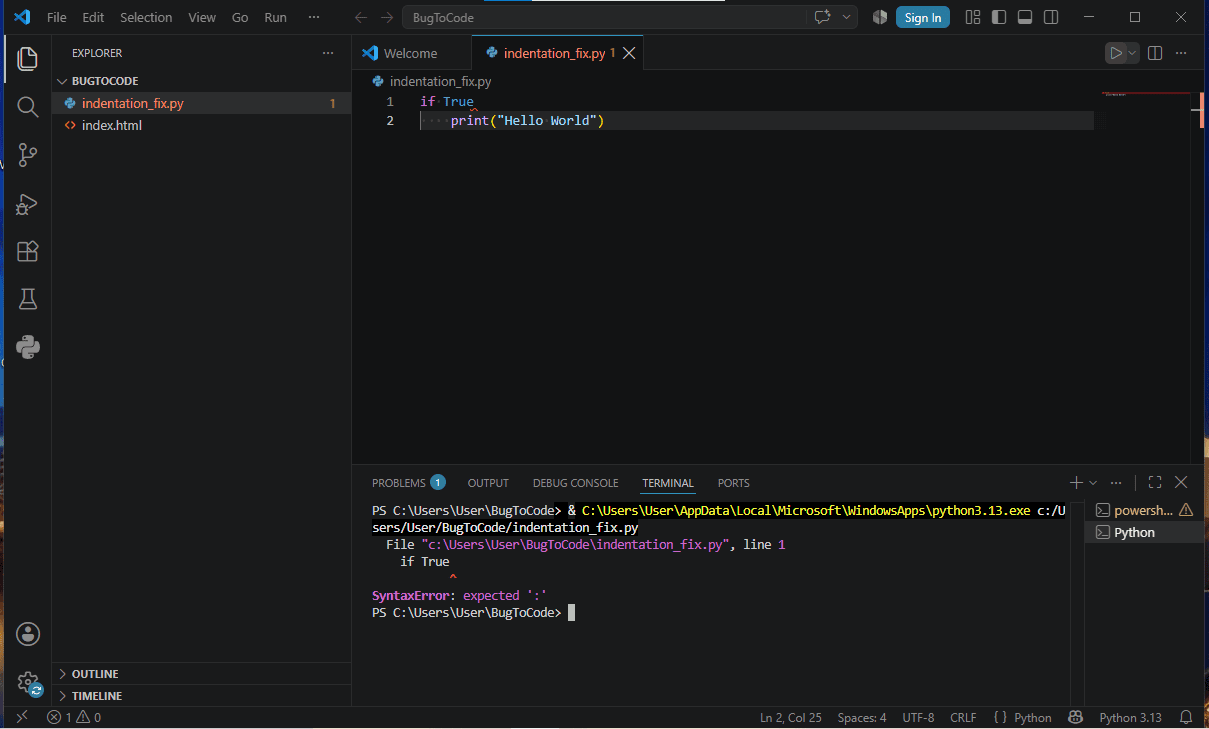
When I executed the script, my VS Code terminal immediately threw red text:
SyntaxError: expected ‘:’
The Solution:
I shared this exact error with ChatGPT. It pointed out that Python requires a colon (:) after if True. I updated the script to:
if True:
print(“Hello World”)
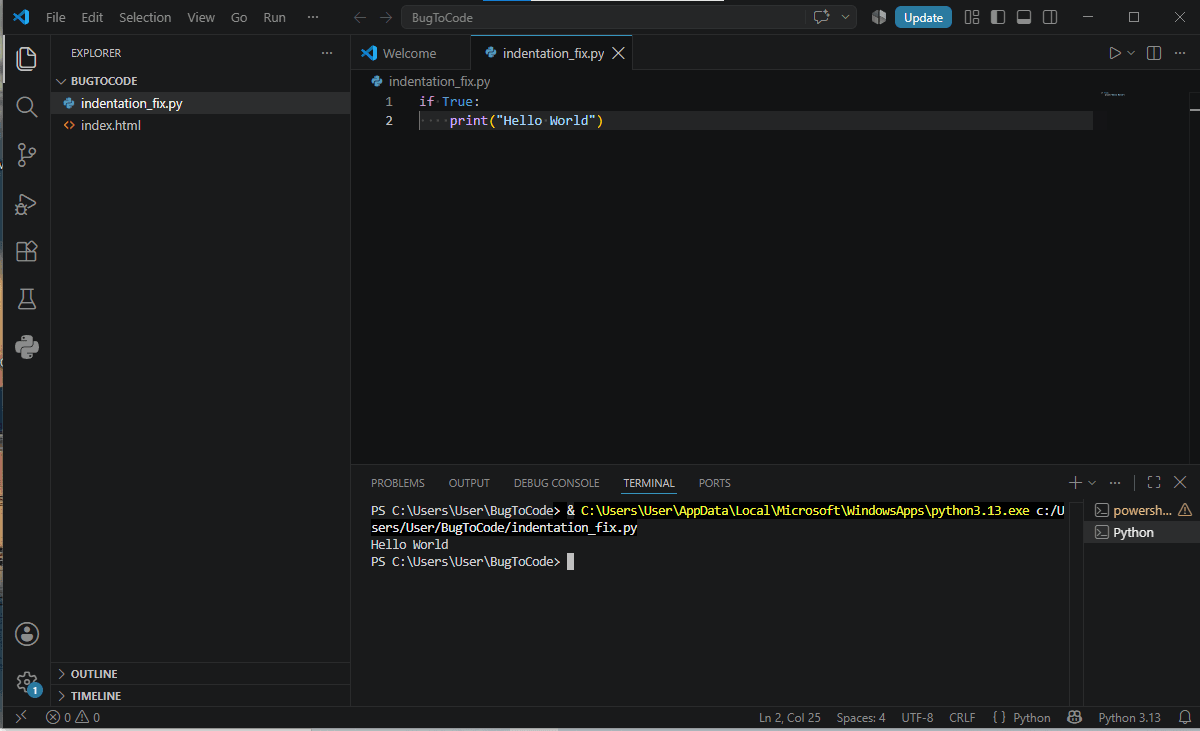
I ran the code again, and the terminal printed a clean Hello World with zero errors!
7. My Personal Tips to Prevent a Python SyntaxError
While ChatGPT is an amazing tool to fix code, preventing errors in the first place saves even more time. Here are my top personal recommendations:
- Enable Linting in VS Code: I always keep the official Python extension and Pylint enabled. It draws a red squiggly line under syntax errors while I type.
- Watch the Color Highlighting: Modern code editors color-code your syntax. If half your file suddenly turns green, you probably forgot to close a string quote.
- Use Auto-Formatters: Tools like Black format your code automatically whenever you save the file, keeping indentation and syntax clean.
8. What are my own thoughts?
From my personal journey in coding, I can assure you that running into a Python SyntaxError is completely normal. It doesn’t mean you are a bad programmer—it just means a small punctuation mark or symbol was missed.
By pairing your coding workflow with ChatGPT, you can solve syntax issues in seconds, learn from your mistakes, and keep building projects without getting frustrated.
For more technical rules and error handling standards, you can always check out the official Python Documentation on Errors.
Python Official Documentation on Errors
Written by Rohit Sharma
Founder, Writer & Editor — ENBC News
Learn more about the author → About Us